![EarthScan_ID_White_RGB-01.png]](https://knowledgebase.earth-scan.com/hs-fs/hubfs/EarthScan_ID_White_RGB-01.png?height=40&name=EarthScan_ID_White_RGB-01.png)
After reading this article, you will learn:
When looking at your assets’ exposure to climate hazards, it’s important to understand how that level of exposure is changing. Therefore, acknowledging the potential extremes, and the proportion of change relative to the historical levels of exposure, is vital.
What are absolute values?
Absolute values are numbers that can be thought of as an independent quantity describing a given metric.
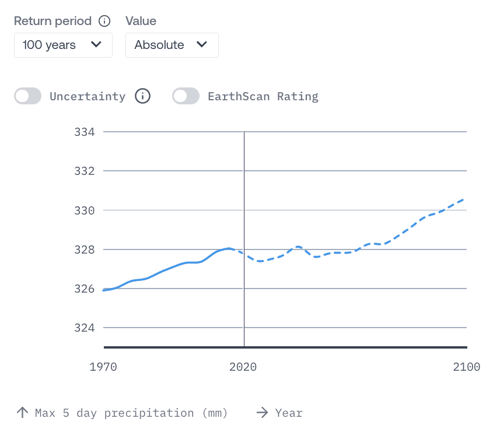
When selecting absolute values in EarthScan, you will see the numerical value of the metric within the chosen Risk Category. For example, when viewing Precipitation risk, the Insight vertical axis will update to display the increase or decrease in maximum 5 day precipitation levels in millimeters. The absolute value is plotted over time from 1970 to 2100 (blue line), and the year you have selected in the Navigation Panel is highlighted (black line).
What are relative values?
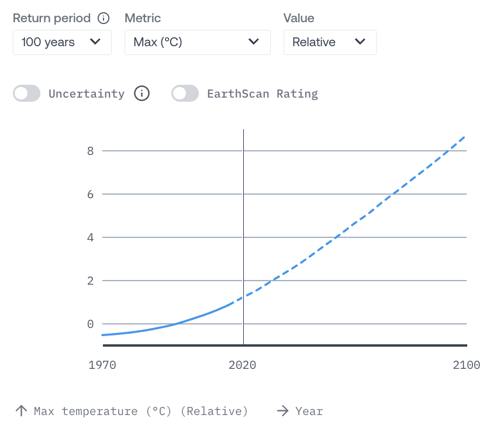
Relative values describe a change with respect to other numbers. In other words, they are relative to other (absolute) quantities, or in terms of EarthScan, the average between the historical baseline values of 1970 to the present. It's important to note that "the present" refers to 2020 (as of the writing of this article), although this reference will be updated to 2025 soon. When selecting relative values in EarthScan, you will see the change in the value of the expected metric within the chosen Risk Category. For example, when viewing Heat Stress risk, the Insight vertical axis will update to display the increase or decrease in maximum temperature or heat wave days by a chosen year, relative to average conditions experienced between 1970 and 2020.
Where can I find the absolute and relative values in EarthScan?
You can view the Insight containing absolute and relative values titled “(Risk Category) risk” by selecting any of the five Risk Categories below from the Navigation Panel:
- Heat stress
- Precipitation risk
- Wind risk
- Drought
- Wildfire
Please note: changes in absolute and relative values cannot be viewed when the Flooding Risk Category is selected in the Navigation Panel.
How do I select the absolute and relative values in EarthScan Insights?
- Select a Risk Category from the Navigation Panel
- Scroll down to the Insight titled “(Risk Category) risk” on the right side of EarthScan
- From the Value dropdown menu, select either Relative or Absolute
How should I use the absolute and relative values in EarthScan?
Absolute values
Absolute values can directly inform your risk management or adaptation strategies. For example, considering heat stress, knowing the absolute value of the maximum temperature you can expect will help with the specific design of your cooling system. Similarly, the absolute maximum temperature can indicate whether existing infrastructure (for example, operating efficiency ranges) is likely to be under threat of exceeding its operational capacity under future climate change.
Absolute values form the basis of several of our EarthScan Rating calculations; for example, 150 mm is used as one of the event thresholds for 5-day precipitation to quantify the risk rating.
Relative values
When selecting relative values, you’re able to determine how much conditions have changed without accounting for the units. For example, it can be difficult to contextualise and understand the impact of a 6 m/s wind gust versus a 12 m/s one when described in absolute terms. Yet, it can be easier to interpret that an increase of +5 m/s puts greater stress on an asset than a +1 m/s increase. It is this concept of additional stress on an asset which is the predominant use of relative values.
Relative values also inform our EarthScan Rating calculations; for example, a likely 20% increase in maximum temperature relative to 2015 is considered an event threshold when calculating the heat stress EarthScan Rating.