![EarthScan_ID_White_RGB-01.png]](https://knowledgebase.earth-scan.com/hs-fs/hubfs/EarthScan_ID_White_RGB-01.png?height=40&name=EarthScan_ID_White_RGB-01.png)
After reading this article, you will learn:
Custom Fields in EarthScan
Custom Fields are metadata categories that allow you to add custom data to your assets. They are unique attributes defined by you and can either be text or numerical values. Use custom fields to add and store information relevant to you and your organization in your Asset Library.
The information contained within each Custom Field allows you to search and filter your EarthScan Insights to get a more refined view of the risk across your Portfolio.
You can define Custom Fields based on your individual use cases. For example:
- Asset Value or Revenue
- Asset Net Profit
- Asset Material
- Asset Age
- Asset Service Use
- Number of Staff
Please note: Once you upload a set of Custom Fields for an asset, these fields “stick” and cannot be deleted or replaced.
How to use Custom Fields in EarthScan
Custom Fields enable you to further explore subsets of your assets and discover new Climate Intelligence Insights.
Your Custom Fields will appear within the Filters option in the Navigation Panel. Filter the assets within EarthScan Insights based on your Custom Fields.
You can also create new Portfolios from the filtered Custom Fields from the Navigation Panel or Asset Library.
You can discover the sum total by risk level for any Custom Field with numerical values (such as Asset Value, or Asset Age) in your Portfolio-level Insights.
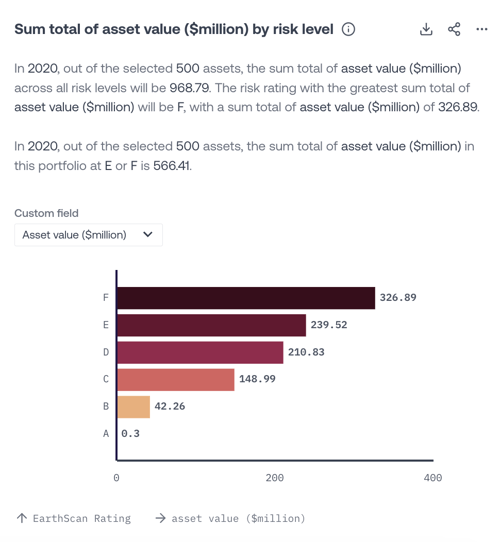
This Insight allows you to evaluate the sum total of any numerical custom attributes and evaluate their exposure to climate hazards over given timeframes and emission scenarios. Use this Insight to evaluate and quantify the risk to your Assets based on attributes relevant to you, such as asset value.
How to create Custom Fields in EarthScan
You can add Custom Fields to your assets when uploading a .csv file. Simply add an extra column for each Custom Field, following this format for the column heading:
earthscan_custom field
Top tips for Custom Fields:
- You can add up to a maximum of ten Custom Fields per .csv file
- Do not include slashes (/) in the Custom Field headings
- Underscores (_) can be used in the Custom Field headings
Find out more about creating a .csv file.