![EarthScan_ID_White_RGB-01.png]](https://knowledgebase.earth-scan.com/hs-fs/hubfs/EarthScan_ID_White_RGB-01.png?height=40&name=EarthScan_ID_White_RGB-01.png)
After reading this article, you will learn:
Download EarthScan Insights
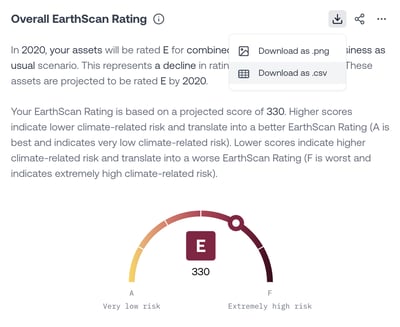
Quickly and easily insert high-resolution visualizations of EarthScan Insights directly into your reports, documents and presentations.
It’s simple to download your Insights in a .png format:
- Click on the Download as .png icon located in the top right corner of the Insight you'd like to download.
- At the bottom of the screen, a notification pop-up appears to indicate that the download is in process.
- Once the download is complete, a tick icon will appear in the notification pop-up.
- The downloaded Insight will appear in the download section of your browser, or in the download folder on your computer.

Download the EarthScan Insights data
It’s simple to download the data behind each Insight in a .csv format:
- Click on the Download as .csv icon located in the top right corner of the Insight you’d like to download.
- Once the download is complete, the .csv file will appear in the download section of your browser, or in the download folder on your computer.
Share EarthScan Insights
EarthScan Insights are regularly updated as we add new data and incorporate the latest climate science. We've made it easy to share the latest Insights directly from EarthScan, so that you always have access to the latest climate intelligence to guide decisions.
You can share EarthScan Insights both within your organization and with external partners.