![EarthScan_ID_White_RGB-01.png]](https://knowledgebase.earth-scan.com/hs-fs/hubfs/EarthScan_ID_White_RGB-01.png?height=40&name=EarthScan_ID_White_RGB-01.png)
After reading this article, you will learn:
How to select return periods in EarthScan
Use return periods to explore the potential magnitude of change to your risk for a particular Portfolio or asset.
Within your EarthScan Insights™, you can select different return periods to explore the potential magnitude of change to your asset’s EarthScan Rating over time, and for each Risk Category available in EarthScan.
To see return periods in your EarthScan Insights, click on the relevant Risk Category in the Navigation Panel and scroll down to the Insight titled "Risk Category risk".
This Insight details the risk across the next century for the Risk Category selected. If you have selected Heat Stress as your Risk Category, the Insight will be titled “Heat stress risk”.
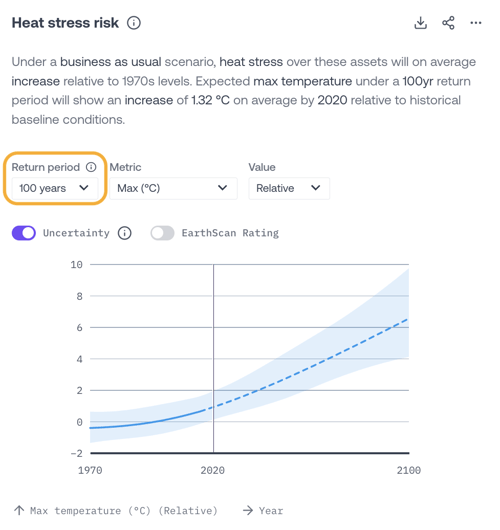
Here, you can select different return periods from the dropdown menu. By selecting the return period, you are querying EarthScan Insights to reveal how much the magnitude of your risk exposure to a particular climate hazard could change for a specific Portfolio or asset.
- The 2-year return period represents a lower magnitude of change, but a higher level of probability.
- The 100-year return period will describe a higher magnitude of change, but at a lower level of probability.
Which return periods to select in EarthScan
Use the table below to explore the availability of return periods in EarthScan and how they translate into probability.
Please get in touch with your Customer Success Manager or contact us at feedback@earth-scan.com if you have any questions on return periods.