![EarthScan_ID_White_RGB-01.png]](https://knowledgebase.earth-scan.com/hs-fs/hubfs/EarthScan_ID_White_RGB-01.png?height=40&name=EarthScan_ID_White_RGB-01.png)
After reading this article, you will learn:
What are EarthScan Insights?
EarthScan Insights are clear, concise summaries and data visualizations, curated by in-house climate experts. The Insights combine the most relevant information on your Portfolio's climate risk, how it has changed over time and how it is projected to change in the future.
Each Insight is a shareable, standalone piece of Climate Intelligence about your Portfolio’s assets. Used together, EarthScan Insights build a complete picture of your Portfolio’s overall climate risk, and break this risk down into detailed Climate Intelligence at the asset-level.
Explore the different features of your EarthScan Insights:
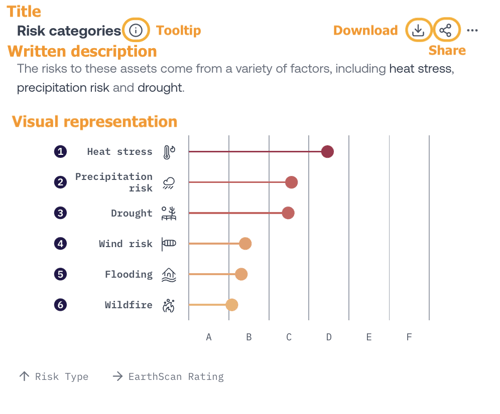
At the top of each Insight, you will find a tooltip button. Each tooltip includes a description on how to use and interpret the Insight, and a citation link.
Insights also include the Interactive Map. It shows the geospatial distribution of your Portfolio’s assets and their EarthScan Ratings.
How are EarthScan Insights generated?
To generate EarthScan Insights, EarthScan combines your Portfolio’s asset data with signals and EarthScan Ratings analysis relevant to your selected Portfolio. This is then translated into individual pieces of Climate Intelligence most relevant to your assets.
The information displayed within Insights is based upon the filters you’ve selected from the Controls in the Navigation Panel, such as Climate Scenario, Risk Category, and EarthScan Rating.
EarthScan Insights are set to a default, Portfolio-level view. You will automatically see this default view when you first view your Personal or Organization Portfolio.
Use the Interactive Map or List View to dive deeper into the Climate Intelligence on specific assets. Once you select an asset, your Insights will automatically update, showing you instant asset level Intelligence.
Discover more about Navigating your EarthScan Insights.
What Climate Intelligence can I find in EarthScan Insights?
EarthScan Insights help you answer questions about the level of risk your Portfolio and assets are exposed to.
EarthScan Insights present a clear picture about your Portfolio’s climate risk. Use them as a guide to understand your Portfolio as a whole. Use the navigation tools to take a deeper look at any key asset with an identified risk.
There are twelve individual EarthScan Insights. Together, these provide the latest science-backed Climate Intelligence for your Portfolio:
- Overall EarthScan Rating - a summary of the overall climate risk across your Portfolio.
- Ratings category distribution - the distribution of your assets within each Risk Category, and the average EarthScan Rating across all your assets.
- Risk through time - an analysis of your Portfolio's climate risk under different climate scenarios.
- Risk distribution - how EarthScan Ratings for your assets are distributed across your Portfolio.
- Risk distribution through time - how the EarthScan Rating distribution of your Portfolio changes through time (from 1970 to 2100).
- High risk assets - which individual assets in your Portfolio have the highest EarthScan Rating.
- Risk categories - which Risk Categories present the highest risk to your Portfolio’s assets.
- Risk categories through time - how the EarthScan Rating in each Risk Category have changed for all of your Portfolio's assets over time.
- Risk by geography - an analysis of your EarthScan Ratings for all of your Portfolio’s assets across geographies.
- (Risk Category) risk - how risk to your Portfolio’s assets in each Risk Category is projected to change over the remainder of the 21st century.
- Sum total of (numerical custom field) by risk level - the sum total of (numerical custom field) for the assets which correspond to each EarthScan Rating.
- Climate Value-at-Risk - for Flooding and Wind only - how CVaR (% damage) is projected to change through time (from 1970 to 2100).
Please note: The '(Risk Category) risk' Insight won’t appear if your Risk Category is set to Combined Physical Risk. To see this Insight, select one of the following Risk Categories: Heat Stress, Precipitation, Flooding, Wind, Wildfire or Drought.
Can I share my EarthScan Insights?
EarthScan Insights can be easily shared across internal teams and departments and also with colleagues and suppliers outside of your organization.
You can share individual EarthScan Insights, or all of the Insights within your Portfolio. Sharing your individual Insights depends on the privacy settings of your Portfolio.
Learn how to share and download your Insights: